
My Lifeanalytics quick guide

A reserved area designed for your needs, available to all Ecol Studio and Lifeanalytics customers.
A Personal restricted-access area that allows you to stay constantly up to date with relevant news and deadlines related to regulatory developments in your specific business sector - and beyond.
The area is designed to provide an inclusive and tailored experience, based on the activated contract, allowing you to:
- Monitor the latest regulatory news and consult the archive of past news;
- Search for and consult all legislative texts relevant to the contractual areas, including thematic insights and related deadlines, with the ability to perform targeted searches and download documents;
- Monitor all deadlines;
- Access documents prepared and uploaded by our Regulatory Update Office, such as periodic summaries and legislative registers;
- Consult the complete archive of Breaking News and Newsletters dedicated to companies in the paper industry;
- Access a section dedicated to viewing quotes, invoices, and samples (available only to Ecol Studio clients).
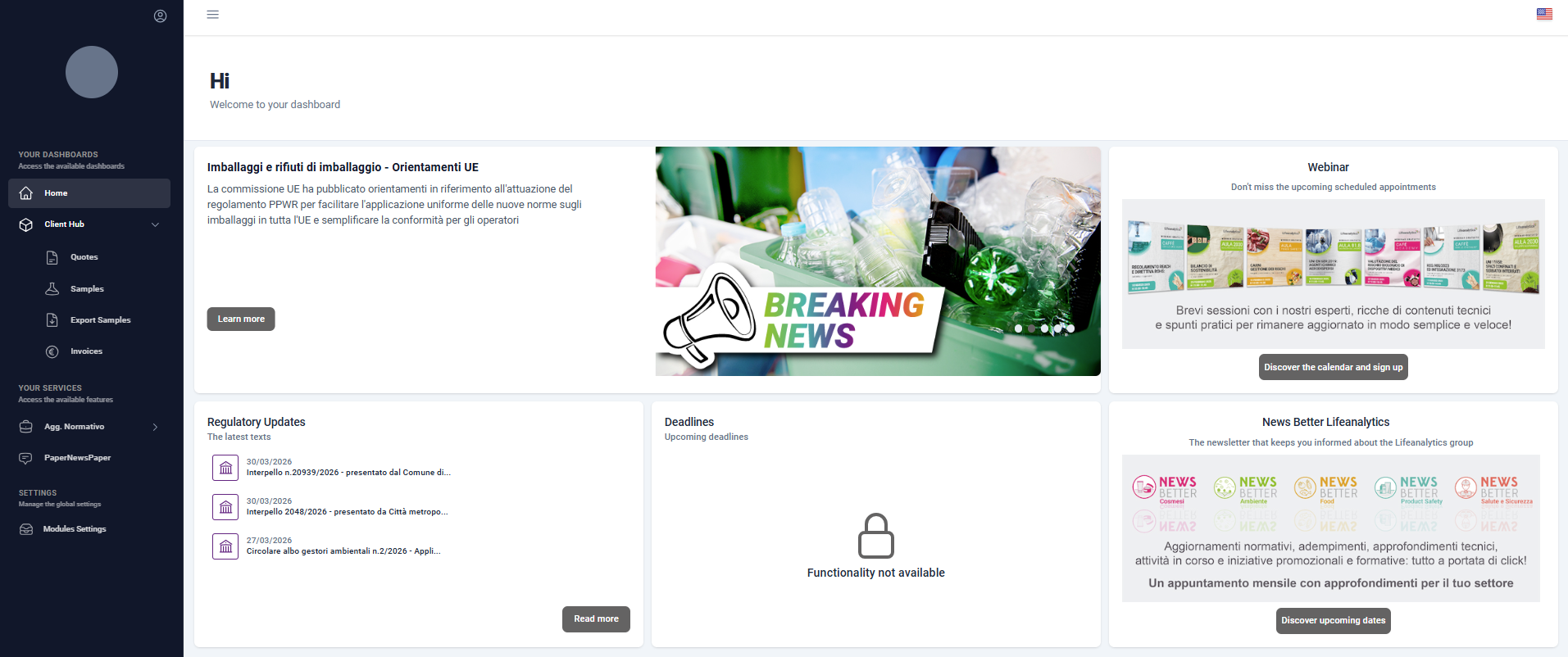
The Reserved Area includes a dedicated client section and two services, available depending on the activated contract.

A free section, accessible to all clients upon registration, allowing you to consult four sub-services with advanced search features:
- QUOTES
A section dedicated to viewing quote;
- SAMPLES
A list of samples sent to the laboratory, including the sampling report, status, and any related test report;
- EXPORT SAMPLES
The ability to export detailed data of samples sent to the laboratory in Excel format;
- INVOICES
An archive of all client invoices.
Within the Regulatory Updates module, four sub-services are available:
- NEWS
A section where all regulatory news is available, with the possibility to search by topic, tag, or keyword.
- LAWS
An archive of legislative texts, organized by topic. For each law, the official text is available along with related deadlines and an in-depth analysis that helps understand the content and its potential impact on your company. Searches can be performed by topic, tag, keyword, or type of document.
- DEADLINES
An archive designed to monitor all deadlines related to your specific business sector, featuring advanced search functionalities.
- DOCUMENTS
A space dedicated to storing regulatory update documents, such as periodic summaries and legislative registers, prepared and uploaded by our dedicated office. For each newly uploaded document, the master user will receive an email alert notification.
All our clients can access the Regulatory Updates module.
Depending on the type of contract signed, one, two, or all sub-service areas of the portal are activated.
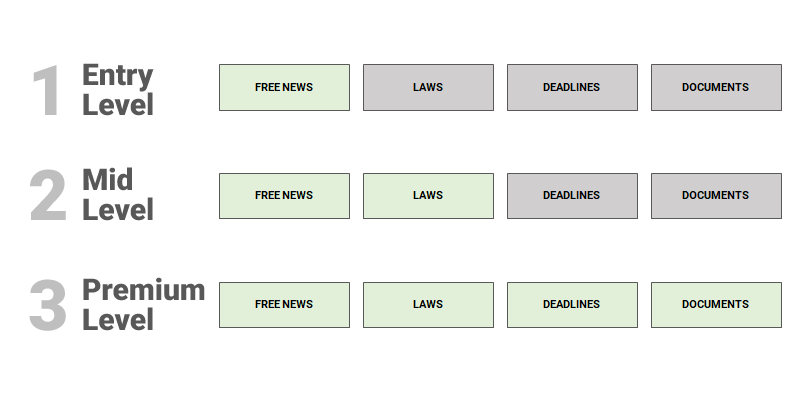
- ENTRY LEVEL (free of charge for all registered clients)
- access to the News archive, with updates on the latest legislative development
- access to the News archive, with updates on the latest legislative development
- MID LEVEL
- access to the News archive
access to the Laws archive, with concise summaries
- access to the News archive
- PREMIUM LEVEL
- Access to the News archive
- Access to the Laws archive, with detailed in-depth analysis
- Access to the Deadlines archive
- Access to the Documents area
The Paper News Paper service provides insights and updates on European and Member State regulations concerning food contact packaging (FCMs).
The complete Paper News Paper package includes:
- BREAKING NEWS
Timely email notifications on the most relevant and binding news regarding the approval, publication, or update of regulations with significant impact on the sector.
- QUARTERLY NEWSLETTER
A structured email summary of the main technical and legislative updates in the food contact materials sector, published during the relevant quarter.
- RESTRICTED AREA ARCHIVE
A dedicated space to access both Breaking News and Quarterly Newsletters, with search functionality by topic, tag, year, or keyword, and the option to download documents.
- TAILORED CONSULTING
Direct support from a PaperNewsPaper team expert, available to clarify doubts and facilitate the correct interpretation of new regulatory provisions.
- ANNUAL TRAINING
An annual training session dedicated to the analysis of the main national and European regulatory provisions, with a focus on practical implications for companies in the sector.
Access to the PaperNewsPaper (PNP) module is reserved exclusively for clients who have signed a Basic, Premium, or Platinum contract.
Depending on the type of contract signed, one or more sub-service.
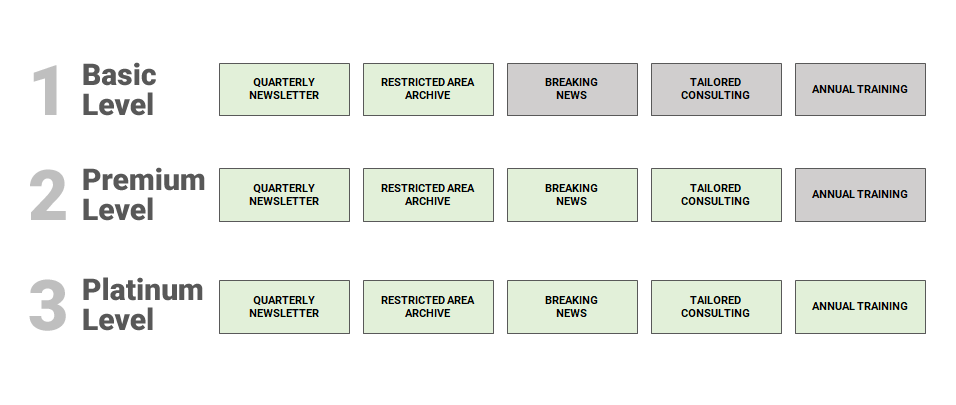
- BASIC LEVEL
- receive the Quarterly Newsletters
- access the archive of Breaking News and Newsletters in the reserved area Restricted area
- PREMIUM LEVEL
- receive the Quarterly Newsletters
- receive the Breaking News
- access the archive of Breaking News and Newsletters in the reserved area Restricted area
- receive a tailored consulting with an expert
- PLATINUM LEVEL
- receive the Quarterly Newsletters
- receive the Breaking News
- access the archive of Breaking News and Newsletters in the reserved area Restricted area
- receive a tailored consulting with an expert
- take part in an annual training session
If you already have your credentials, access the portal directly.
User Type
Within the personal area, it is possible to create and manage multiple user accounts.
The main (master) account, validated by our Team, can independently register new secondary accounts and manage existing ones.
To do so, simply access the Records menu in the Module Settings section.
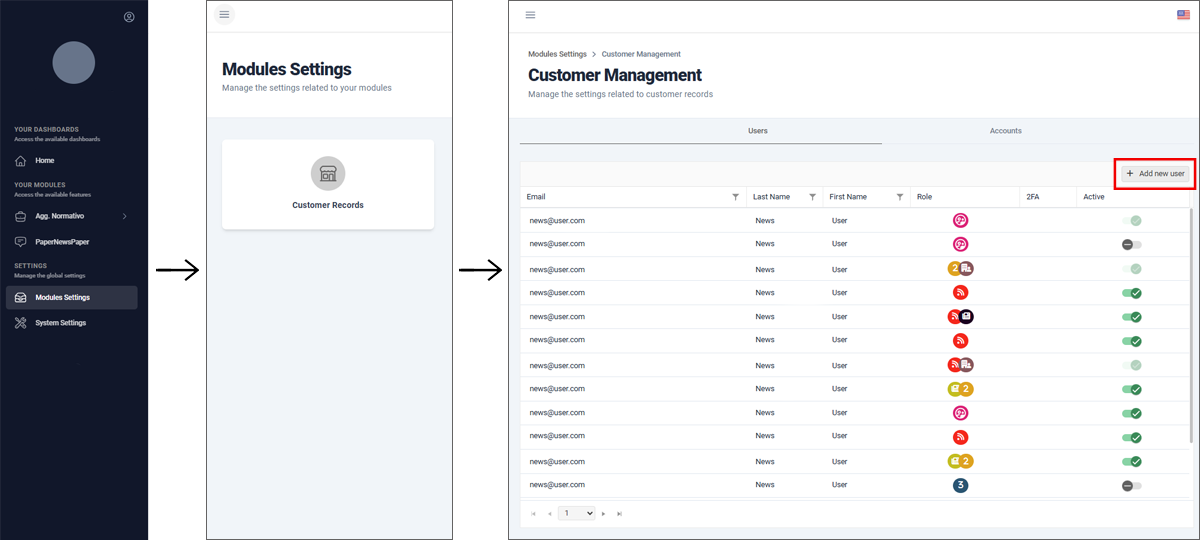
From the Records area, it is possible to manage existing user accounts: verify associated email addresses, deactivate users, and edit their details.
By clicking on the user’s name, you can access the edit screen, from which it is also possible to send a Reset Password email.
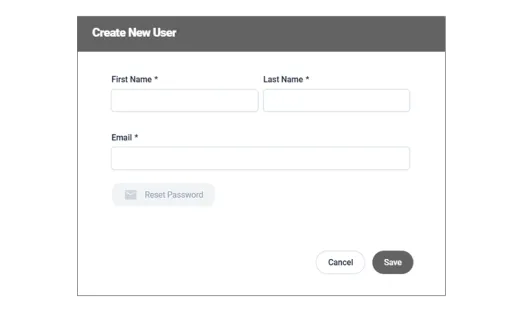
To create a new secondary user account, simply click “+ Add new user”, complete the form with the new user’s details, and save. The system will automatically send an email to set the password.